
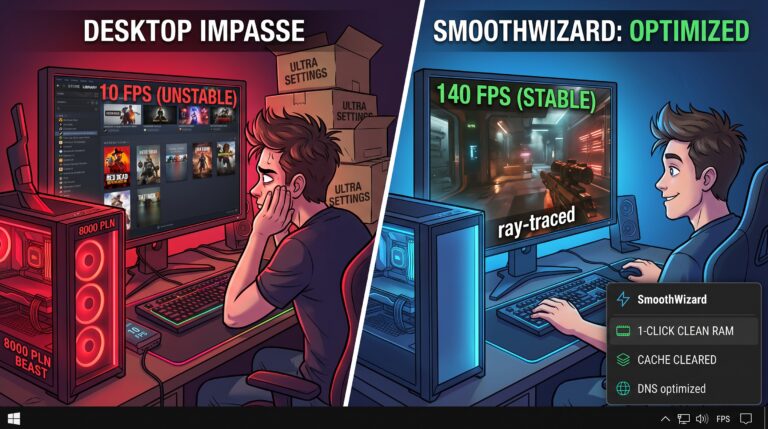

When, after weeks of hunting for components, the courier finally carries into the room boxes worth as much as a small car from a second-hand car dealership, a cinematic soundtrack plays in your head. Ray tracing is supposed to blow your mind, the frame rate to exceed human perception, and you’ll finally be able to play through all those backlogged AAA titles on Ultra settings. After all, it’s an investment for years to come.
Reality puts this plan to the test a few days after you’ve peeled the protective film off the tempered glass. This phenomenon is known in the community as ‘Gamer’s Syndrome’, a specific condition whereby the more expensive and powerful your kit is, the less you feel like playing anything at all.
The anatomy of the problem: From euphoria to an existential crisis.
What does this process look like step by step?
Shopping frenzy and research: You trawl through hundreds of benchmarks, compare memory clock speed curves and convince yourself that a Platinum-certified power supply and that more expensive cooling system are matters of national security.
The first-boot ritual: You install the most graphically intensive beast, run the built-in benchmark, watch a steady 140 FPS in 4K, nod approvingly… and shut the game down after 12 minutes.
The desktop impasse: You’re sitting in front of a machine that cost 8,000 zł, scrolling through your library of 400 games on Steam and coming to the conclusion that, all things considered, there’s ‘nothing worth playing’.
Why does this happen? Because when you spend 8k, subconsciously you’re not just buying silicon – you’re buying free time and the youthful enthusiasm of a decade ago. Meanwhile, adulthood means that after a full day’s work, your decision-making capacity is at rock bottom. Complex storylines, tutorials and micromanaging your inventory sound like a second job. The result? Your gaming beast becomes the most expensive radiator in the room, which you use to stream YouTube or roast a turkey in a pixelated game.
And here comes the second problem: just when you want to play, the system says ‘no’
Even if you overcome your tiredness, launch a game and sit down to play, another blow awaits: micro-stutters, unstable frame rates and bloatware.
Modern Windows has a habit of running dozens of background processes, telemetry and updates that hog resources precisely when you need them most. There’s nothing more frustrating than spending 8,000 zlotys (if not more) on a computer and then seeing stuttering during fast-paced moments. Instead of pure relaxation, you end up nervously glancing at the 1% low FPS graph.
And that’s exactly where SmoothWizard comes in.
Smooth performance without a PhD in operating systems.
If you’ve got powerful hardware, it should perform powerfully – no compromises, no frame drops and no need to spend four hours in the system registry manually disabling Microsoft services.
SmoothWizard takes care of all the dirty work involved in optimising for games:
Frees up resources: It disables unnecessary background processes and services that are choking your CPU and RAM.
Stabilises frame rates: Eliminates annoying frame time spikes, ensuring the game runs as smoothly as the benchmarks promised.
Pure convenience: You click a few sliders – or just one for the full optimisation – and the system is ready for uninterrupted gaming, with no risk of accidentally breaking anything.
We can’t cure your adulthood for you, nor can we add extra hours to the day, however much we’d like to. But we can guarantee one thing: when you do find that one spare hour – or five – in the evening and sit down at your 8k machine, it’ll perform exactly as you imagined it would.
What is SmoothWizard? Your personal control panel in the system tray
SmoothWizard is a utility application designed for gamers who want maximum smoothness and full control over their system without spending hours in the Registry Editor or Windows Services.
Instead of bloated software, you get a fast, handy control panel accessible directly via a right-click on the icon in the taskbar (next to the clock):
Instant optimisation (1-Click):
RAM cleanup – quickly free up cache memory before launching resource-intensive games.
Shader cache & temporary files – remove unnecessary junk and corrupted GPU caches with a single click, without having to search for hidden folders on your system.
DNS Tools (Search & Change) – instantly test ping times for multiple DNS servers and switch to the one with the lowest latency.
Emergency tools – Process Killer for frozen games and built-in System Repair (SFC / DISM).
Advanced shortcut and window zone configurator:
Create your own context menus with games and applications.
Batch launch with monitor zones – a single click in the system tray can launch a game in full-screen mode on the main monitor, whilst automatically arranging Discord and OBS in designated halves on the second monitor.
Lightweight and convenient: Two display modes in the system tray (quick flat list or drop-down submenu), zero lag and instant response without restarting Windows.
FAQ: Frequently Asked Questions
1. Will SmoothWizard really speed up my computer?
SmoothWizard doesn’t promise a magical ‘doubling of frame rates’, but it does remove system bottlenecks. It allows you to clear RAM, remove unnecessary cache files and optimise your network connection (DNS) in a fraction of a second, resulting in more stable frame times and no sudden stutters.
2. Do I have to open the full programme window every time?
No. SmoothWizard has been designed so that all key actions are accessible via the context menu of the icon in the system tray (next to the clock). Simply right-click to instantly clear RAM, change your DNS settings or launch a pre-configured set of programmes.
3. Does the programme make permanent changes to system files?
No. The application does not corrupt the registry or remove key Windows components. It uses secure, built-in system mechanisms and allows you to undo any changes at any time.
5. How can I test the application before installation?
An interactive 3D browser-based simulator is available on the homepage; you can visit the site, explore the interface, try out the sliders and see the tool in action in real time before downloading anything to your hard drive. What’s more, you can try the PRO version for up to 7 days for free.
Stop struggling with the system and let your 8k machine run as it should from day one.
Try SmoothWizard and rediscover the pure joy of gaming.
