
CPU Core Affinity in PC Gaming: How to Optimize Processor Threads, Eliminate Micro-Stutters, and Boost FPS.
Modern gaming computers feature processors packed with high core counts and multiple logical threads. However, simply owning a high-end CPU does not guarantee that every game utilizes its full performance potential. The default Windows Thread Scheduler frequently distributes active tasks across system cores at random.
Consequently, background voice chat, open browser tabs, recording tools, and routine system services frequently share the exact same physical cores rendering a critical in-game firefight. The practical solution to this resource bottleneck is CPU Affinity Management and Core Isolation.
What Are CPU Cores and Threads?
Definition:A CPU Core is an independent, physical computing engine located on the processor die that independently fetches, decodes, and executes software instructions.
Legacy processors contained only a single core, meaning the machine could execute only one operation at any given fraction of a second. Contemporary processors are multi-core architectures (featuring 6, 8, 16, or more physical cores) capable of running multiple complex workloads simultaneously.
Key processor architectural concepts include:
- Physical Core: The actual hardware silicon processing unit built directly into the CPU die.
- Logical Thread (e.g., Hyper-Threading / SMT): A virtual division of a single physical core into two separate execution pipelines, streamlining data flow from system RAM.
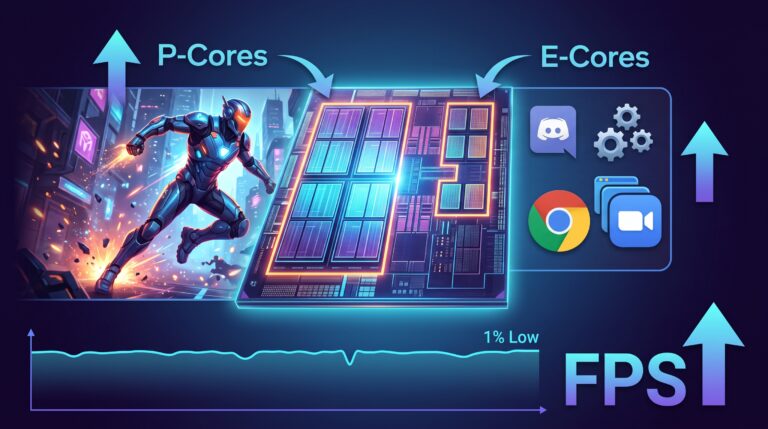
- Performance Cores (P-Cores): High-frequency, heavy-duty physical cores designed specifically for priority workloads like game engines, particle rendering, and physics calculations.
- Efficient Cores (E-Cores): Compact, energy-efficient processing units engineered for low-power multitasking and background task execution.
How CPU Task Distribution Works: Fast Cores for Games, Sub-Cores for Background Tasks
On modern hybrid CPU architectures and multi-die processors (including AMD Ryzen chips featuring 3D V-Cache), where game code executes determines overall system fluidity.
When launching a demanding title, the operating system should prioritize the fastest physical cores for the main game thread. In reality, standard Windows scheduling often creates bottlenecks:
- Shifting active game threads onto slower Efficient Cores (E-Cores).
- Allowing intrusive background tasks (such as Discord, Spotify, and telemetry) to interrupt dedicated game threads.
- Triggering constant thread context switching, which incurs latency penalties within the L3 CPU cache.
Strategic CPU core isolation solves this by strictly separating workloads:
- Primary Performance Cores (P-Cores): Dedicated exclusively to the active game process.
- Secondary / Efficient Threads (E-Cores & Virtual Threads): Dedicated to background applications, system drivers, and desktop services.
Real-World Benefits of CPU Core Isolation
Isolating the game process from operating system clutter delivers immediate, measurable performance stability:
- Eliminating Frametime Spikes: Background applications no longer interrupt active rendering loops during intense combat, explosions, or asset streaming.
- Higher and More Stable 1% Low FPS: Significantly reduces sudden frame pacing drops when loading dense textures or traversing open-world environments.
- Potential Frame Rate Gains: Gamers utilizing dedicated core affinity profiles frequently report noticeably smoother gameplay and gains of up to +30 FPS.
Important Technical Note: Actual performance improvements depend directly on your specific PC hardware configuration—including CPU architecture, core count, RAM speed, and individual game engine optimization. Systems running hybrid or high-core-count processors observe the most substantial stability gains.
How SmoothWizard Automates CPU Core Management
Manually adjusting CPU affinity inside Windows Task Manager is tedious, and Windows resets those assignments whenever a game restarts. SmoothWizard handles the entire process automatically in real time:
- Instant Game Detection: Detects when a game launches and instantly pins the primary game process to your fastest physical CPU cores.
- Automated Background Task Shunting: Moves non-essential secondary processes (launchers, voice apps, background services) to reserved auxiliary threads.
- L3 Cache Affinity Optimization: Prevents erratic core hopping across different processor dies, maximizing hardware cache utilization.
- Seamless State Restoration: Automatically restores standard Windows thread balancing as soon as the game closes.
Frequently Asked Questions
Is modifying CPU core affinity safe for my processor?
Yes. CPU Affinity is a native, secure Windows operating system function. It does not alter hardware voltages, thermal limits, or factory clock speeds, making it 100% safe for your hardware.
Which processors benefit the most from core affinity tuning?
Hybrid architecture processors (such as Intel Core 12th, 13th, 14th Gen and newer) and multi-CCD AMD Ryzen CPUs (especially models with 3D V-Cache) see the largest improvements in frametime consistency.
Do I need to manually configure every game individually?
No. SmoothWizard automatically identifies active game titles and background processes, applying optimal affinity rules in the background with zero manual setup required.

SmoothWizard