

Type your paragraph here
Leaks, Rockstar’s release history and how to prepare your computer with SmoothWizard
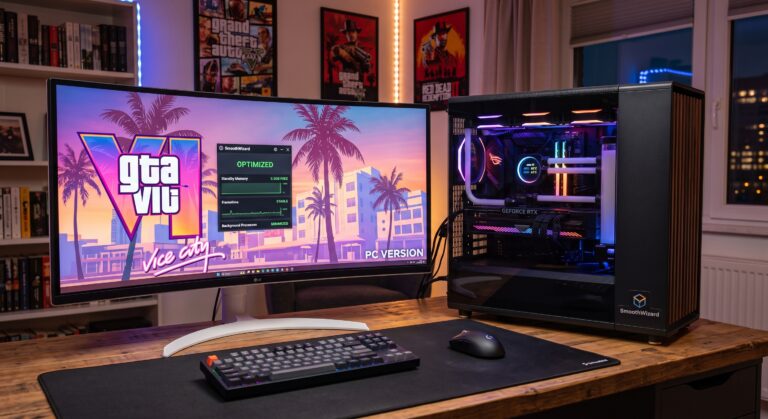
Grand Theft Auto VI is undoubtedly the most eagerly anticipated game of the decade. Whilst console gamers are counting down the months until their return to Vice City, the PC community is asking itself two key questions: when will GTA 6 arrive on PCs, and how can you prepare your system to avoid major frame rate drops?
Rockstar Games has for years been following a tried-and-tested – albeit painful for PC gamers – release strategy. Let’s take a look at the leaks so far, the studio’s release cycle, and why, without optimising Windows using programmes such as SmoothWizard, even powerful computers may struggle.
When will GTA 6 be released on PC? Estimated timeframe
Official announcements from Rockstar Games and Take-Two Interactive have focused on current-generation consoles (PlayStation 5 and Xbox Series X/S). However, the absence of PCs in the first trailers is standard procedure for this studio, rather than a sign that the platform has been abandoned.
The release history of Rockstar Games’ hits speaks for itself:
Grand Theft Auto IV: April 2008 (consoles) $\rightarrow$ December 2008 (PC) – approx. 8-month gap.
Grand Theft Auto V: September 2013 (PS3/Xbox 360) $\rightarrow$ April 2015 (PC) – approx. 19-month gap.
Red Dead Redemption 2: October 2018 (consoles) $\rightarrow$ November 2019 (PC) – approx. 12-month gap.
What do industry leaks suggest?
Take-Two’s financial reports and leaks from early builds point to one thing: the PC version is being developed in parallel, but fine-tuning it takes time due to the vast number of hardware configurations. A realistic scenario suggests a PC launch 12 to 18 months after the console release.
Expected hardware requirements and challenges for the PC
Early footage from GTA 6 has revealed incredibly advanced physics simulation, dense crowds of NPCs controlled by enhanced artificial intelligence, and dynamic volumetric water and lighting powered by the RAGE engine.
For computers, this poses a huge challenge:
An NVMe SSD as the foundation: Lightning-fast asset streaming whilst driving at high speed through the city rules out traditional HDDs.
32 GB of RAM as the new standard: The complexity of the map and advanced background scripts will quickly fill up the system memory.
High CPU thread load: Simulating life in Vice City will push 6- and 8-core processors to their limits.
However, the biggest problem in such a complex open world will not be the average frame rate itself, but sudden drops in smoothness (frame time spikes and 1% Low drops) when entering densely populated neighbourhoods or during a police chase.
How will SmoothWizard prepare your computer for the launch of GTA 6?
Even a top-of-the-range graphics card and a fast processor will fail if Windows starts churning through background processes or clogs up the memory buffer whilst you’re playing. SmoothWizard solves these problems at the system environment level:
1. Automatic clearing of the Standby List
Open-world games are constantly loading and unloading textures for cars, buildings and character models from RAM. When Windows clogs the cache with old data, the screen freezes for a second. SmoothWizard frees up the Standby buffer in real time, ensuring there is free space for new game resources.
2. Dedicated control of CPU cores for the RAGE engine
Calculating physics and traffic in GTA requires maximum multithreading power. SmoothWizard’s processor management module assigns the game process to the fastest physical CPU cores, pushing messaging apps, the browser and system services onto reserve threads.
3. Suppressing telemetry and Windows Update with the PRO module
There’s nothing worse than a sudden background update check whilst fleeing from a 5-star police pursuit. The SmoothWizard PRO version safely disables resource-intensive telemetry and blocks Windows diagnostic tasks – always creating an automatic System Restore Point before every change.
4. Flat frame time graph and elimination of micro-stuttering
By optimising the GPU driver’s render queue and cutting out unnecessary background services, SmoothWizard stabilises the 1% Low FPS metric, eliminating camera jerks at high speeds.
Summary:
The PC release of GTA 6 will certainly set new standards for graphics, but it will also place unprecedented demands on our machines. Rather than waiting for launch patches from the developers, it’s worth preparing your Windows environment now.
Install SmoothWizard, trim your system of unnecessary bloat, and enjoy a stable frame rate from the very first minute in Vice City.
FAQ: Frequently Asked Questions
Will SmoothWizard increase the FPS in open-world games?
Yes. By limiting background task activity and optimising CPU core allocation, SmoothWizard not only increases the average frame rate but, above all, drastically improves the 1% Low FPS metric, eliminating annoying screen stuttering.
Is the Windows optimisation in SmoothWizard safe for other games?
100%. SmoothWizard does not modify the game files themselves and does not breach anti-cheat policies. The programme only tunes native Windows services, ensuring higher performance in all demanding titles.
